Setting Up Singpass as a Newcomer to Singapore

If you hold a work pass, Dependant's Pass or student pass with a FIN, you can register for a Singpass account from the Monday after your pass is issued, using Face Verification — no Singapore mobile number needed.
On this page11 sections · tap to jump
- 01Can a foreigner get Singpass?
- 02When you can register: the Monday rule
- 03How to register with your FIN
- 04Setting up 2FA (and the mobile-number catch)
- 05Setting up the Singpass app
- 06FIN account vs Singpass Foreign Account (SFA)
- 07If you are registering from overseas
- 08Getting help at a Singpass counter
- 09What you will use Singpass for
- 10Keeping your account safe
- 11What this means for your move
Singpass is Singapore’s national digital identity — the login that unlocks over 2,700 government and business services, from checking your tax to booking a clinic appointment. For a newcomer it is one of the first things to set up, because so much of daily admin runs through it. The good news: if you hold a work pass, Dependant’s Pass or student pass, you are already eligible. Here is how to get set up, including the catches that trip up people who do not yet have a local phone number.
Can a foreigner get Singpass?
Yes. Singpass is open to every Singapore Citizen, Permanent Resident or Foreign Identification Number (FIN) holder aged 15 and above. A FIN is the identity number printed on your work pass, Dependant’s Pass, Long-Term Visit Pass or Student Pass card, so most newcomers qualify the moment their pass is issued.
There are two different “Singpass for foreigners” situations, and mixing them up wastes time:
- You have a FIN (you live or work here on a pass) — you set up a standard Singpass account tied to that FIN.
- You have no FIN (you deal with Singapore from abroad, for tax or company matters) — you may need a Singpass Foreign Account (SFA) instead.
When you can register: the Monday rule
This is the single most common surprise. Work-pass holders can only register for Singpass on the Monday after their work pass has been issued. If your Employment Pass or S Pass was issued on a Wednesday, the account will not register until the following Monday — not a system glitch, just how the records sync.
In practice many new pass holders never register manually at all. When you complete card registration at MOM’s pass services centre — where your fingerprints and photo are taken — MOM also registers you for a Singpass account so you can view your digital work pass in the SGWorkPass app. If that has happened, you simply log in rather than register.
How to register with your FIN
If you do need to register yourself, it is a short online process:
- Go to the Singpass website and choose Register for Singpass.
- Verify with Singpass Face Verification. You need a computer with a webcam or a phone with a front-facing camera; follow the on-screen prompts to scan your face.
- Create your password, then set your contact details.
- Activate 2FA and, ideally, install the app (below).
Your Singpass ID is your FIN by default. Registering is free, and you never need to pay a third party or hand your details to an agent to do it for you.
Setting up 2FA (and the mobile-number catch)
Two-factor authentication (2FA) is the second security layer on top of your password. Singpass offers SMS one-time passwords, Face Verification and the app. The catch for newcomers:
Singpass only accepts a Singapore-registered mobile number for SMS 2FA. If you have just landed and do not yet have a local SIM, you cannot set up SMS 2FA. That is not a dead end — you can still log in and set up the app using Singpass Face Verification, which every user has. Once you buy a local SIM, add the number so you also have the SMS option.
As a new user you are prompted to register your mobile number on first login, which activates SMS 2FA instantly. Existing users can add or change it later from the Singpass portal under Set up 2FA.
Setting up the Singpass app
The app is what makes Singpass painless day to day: you log in with your fingerprint, face or a six-digit passcode instead of typing a password, and you carry a Digital IC to prove your identity at counters.
- Download the app only from the official stores — Apple App Store, Google Play or Huawei AppGallery. Check that the developer is Government Technology Agency before installing; never sideload a “Singpass” app from a link.
- Open the app and acknowledge the terms.
- Log in with your Singpass ID (your FIN) and password.
- Verify your identity — local users enter an SMS OTP and do a face scan; overseas users do the face scan only.
- Confirm your details, optionally enable biometric unlock, and finish.
FIN account vs Singpass Foreign Account (SFA)
If you do not have a FIN but still need to transact with Singapore — for example a foreign company director filing with IRAS, or someone using GoBusiness or MinLaw services — you use a Singpass Foreign Account (SFA). It is a different animal from a FIN-based account:
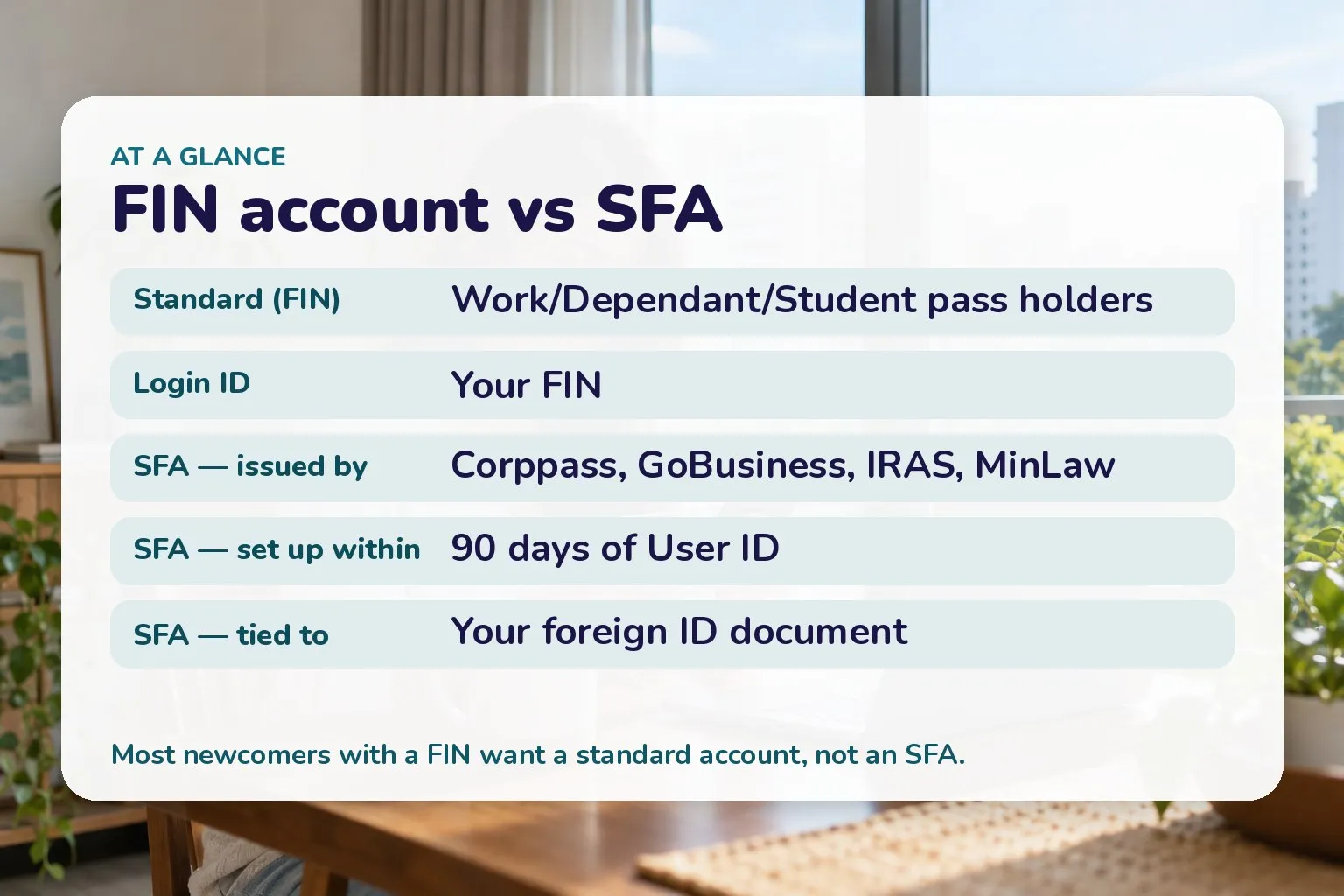
The two Singpass routes for foreigners.
- An SFA can only be issued by four agencies: Corppass, GoBusiness, the Inland Revenue Authority of Singapore (IRAS) and the Ministry of Law (MinLaw). You register your details with the relevant agency; after verification it pre-registers your SFA and Singpass emails you a User ID that starts with “Y”.
- You must set up the account within 90 days of receiving that User ID, or it is terminated and you start over with the agency.
- The SFA is tied to your foreign identity document (such as your passport) and expires when that document expires — update the agency before it lapses.
- SFA holders log in through the app using the User ID, the registered email and the Foreign ID, with a one-time password sent to email. There is no Singpass password to reset.
If you are registering from overseas
The steps are the same, done through the Singpass portal with Face Verification (a webcam or front-facing camera is enough). The sticking point is again the phone: with no Singapore-registered number you cannot use SMS 2FA. The official workaround is to update your overseas address with ICA and rely on Face Verification to log in and set up the app.
Getting help at a Singpass counter
If online set-up fails, island-wide Singpass counters can register you, set up SMS 2FA, reset your password or update your details in person. Bring the right original document:
- FIN holders: your EP, PEP, S Pass, Work Permit or Dependant’s Pass card (a Singapore driving licence also works for most).
- An In-Principle Approval (IPA) letter is not accepted for verification — you need the issued card.
You must appear yourself; no one can do it for you. Counter locations and hours change, so check the official Singpass counter locator before travelling.
What you will use Singpass for
Singpass is not a one-off chore — it is the key to settling in. With it you can file income tax with IRAS, check records with MOM and ICA, manage CPF once you are a PR, book public healthcare, sign documents remotely with Sign with Singpass, and pre-fill forms using your Myinfo data so you stop re-typing your details. GovTech reports more than 41 million Singpass transactions a month, which tells you how central it is.
Keeping your account safe
Scams targeting Singpass are common. Treat your credentials like the keys to your identity: never share your Singpass ID, password or 2FA details, and remember you may be held criminally liable if your account is used by others for a crime. Download the app only from official stores, and if you ever get an alert about a change you did not make, contact the Singpass helpdesk at once.
What this means for your move
- If you have a FIN, wait for the Monday after your pass is issued, then register with Face Verification — no local SIM required yet.
- Set up the app early; it removes the password and gives you a Digital IC.
- Add your Singapore mobile number for SMS 2FA once you have a local SIM.
- Only consider an SFA if you have no FIN and must deal with IRAS, Corppass, GoBusiness or MinLaw from abroad.
New here? Line up the rest of your first-week admin: see how to open a bank account, get a SIM card, and — if you are weighing which pass you hold — read Employment Pass eligibility and the Personalised Employment Pass guide.
General information only, from GovTech and official Singapore government sources, with the date each rule was checked. We are not a government agency; confirm the current steps on the official Singpass website for your own case.
Sources
- Singpass — For Individuals — GovTech Singapore (as of October 2026)
- Singpass (digital services overview) — GovTech Singapore (as of October 2026)
- How do I register for a Singpass account? — GovTech Singapore (AskGov) (as of October 2026)
- I am living overseas. How do I register for a Singpass account? — GovTech Singapore (AskGov) (as of October 2026)
- How do I register for a Singpass Foreign user Account (SFA)? — GovTech Singapore (AskGov) (as of October 2026)
- How do I set up SMS 2FA? — GovTech Singapore (AskGov) (as of October 2026)
- How do I download and set up my Singpass app? — GovTech Singapore (AskGov) (as of October 2026)
- Set up Singpass app as a Singpass Foreign Account (SFA) — GovTech Singapore (AskGov) (as of October 2026)
- Where can I get help for Singpass related matters? — GovTech Singapore (AskGov) (as of October 2026)